Before You Add Headcount, Check for a Process Problem
When one reliable person has to remember every handoff, the team may look productive while the way it operates grows increasingly fragile.
I see this often in growing teams. Work starts to cross more apps, approvals, and people, yet the process still lives in someone’s head. The first instinct is usually to add capacity. I would look at the process first.
Here is how to spot a process problem, understand what it costs a smaller B2B company, and decide what to review before hiring another person or buying another tool.
A busy team can hide a broken process
Process problems rarely arrive as dramatic failures. More often, they look like capable people staying busy.
Someone copies details from one system to another. A manager checks whether an approval went through. A founder follows up because a request has gone quiet. The work gets done, but only because a few people know what needs to happen next.
The issue is not a lack of effort. It is that recurring work relies on memory, personal follow-up, and informal routing.
For an SMB, that dependency can become expensive quickly. The people who should be improving the business end up spending their time keeping routine work on track.
One request is usually a chain of work
Consider a vacation request.
It might begin with a direct message, but that message is only the trigger. Someone still needs to take several steps.
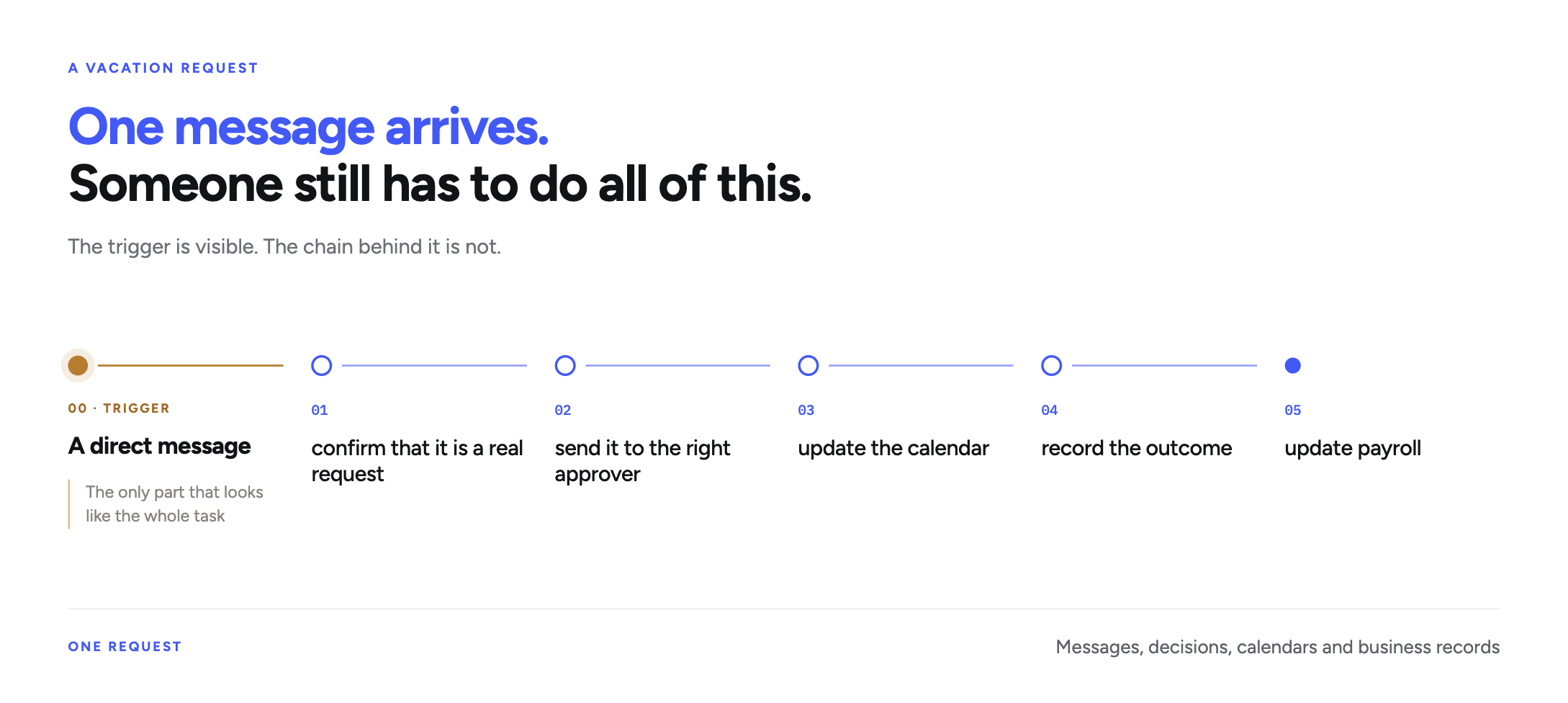
What appears to be a small administrative task is actually a connected process spanning messages, decisions, calendars, and business records.
That distinction matters. Automating the first step will not fix the rest of the chain. A faster notification still leaves someone responsible for the approval, update, and follow-up.
The signs I look for in a growing team
Not every manual task needs to become a workflow. Some work is rare, low-risk, or simply easier to handle directly.
I would take a closer look at recurring work when several of these signs appear together:
- One person has become the default owner of many small operational steps.
- A request arrives through one channel but requires action in several systems.
- The process repeats daily, weekly, or monthly with only minor changes.
- Approvals depend on someone remembering to ask at the right time.
- Context is scattered across messages, documents, calendars, billing tools, or internal notes.
- Work slows down when a particular employee is away.
- Everyone feels busy, but important background work still fails to move.
The absence test is especially useful.
If the honest answer is, “We would have to ask them how it works,” you have found an operating dependency.
Good people often create hidden dependencies
Most process problems do not start with poor organization. They start with capable people solving problems as the company grows.
First, the tool stack expands. A task that once lived in a single system starts touching Slack, a calendar, a CRM, a billing platform, and a reporting document. The work changes, but no one redesigns the process around it.
Repetition then hides the complexity. Because a task happens often, the team treats it as routine. Yet routine work can still involve judgment, exceptions, timing, and downstream effects.
The business also starts optimizing for completion rather than visibility. As long as the work gets done, no one stops to document how it moves. Over time, one person becomes the bridge between systems and teams.
That model works until volume increases, the person is unavailable, or the company needs the process to run without constant attention from leadership.
The cost appears before the process breaks
You do not need a complete failure to feel the effects of unmanaged recurring work.
The cost often appears as:
Lost time
People spend hours moving information and chasing the next step.
Approval delays
Work waits because the next decision is not routed clearly.
Operational fragility
One absence can slow down the entire chain.
Leadership bottlenecks
Founders and managers remain involved in repeat decisions.
Stalled priorities
Strategic work keeps losing out to urgent, repetitive tasks.
A better workflow offers more than speed. It also provides relief. People no longer have to act as human reminder systems, leaving them with more attention for customers, decisions, and improvements.
This is also why changing a workflow can feel personal. Some employees are eager to hand off repetitive work. Others want proof that the new process will be reliable. Trust comes from making the workflow visible and bounded, not from asking people to believe that AI will handle everything.
Automating one action does not fix the workflow
I often see teams automate the most visible step and assume they have solved the process.
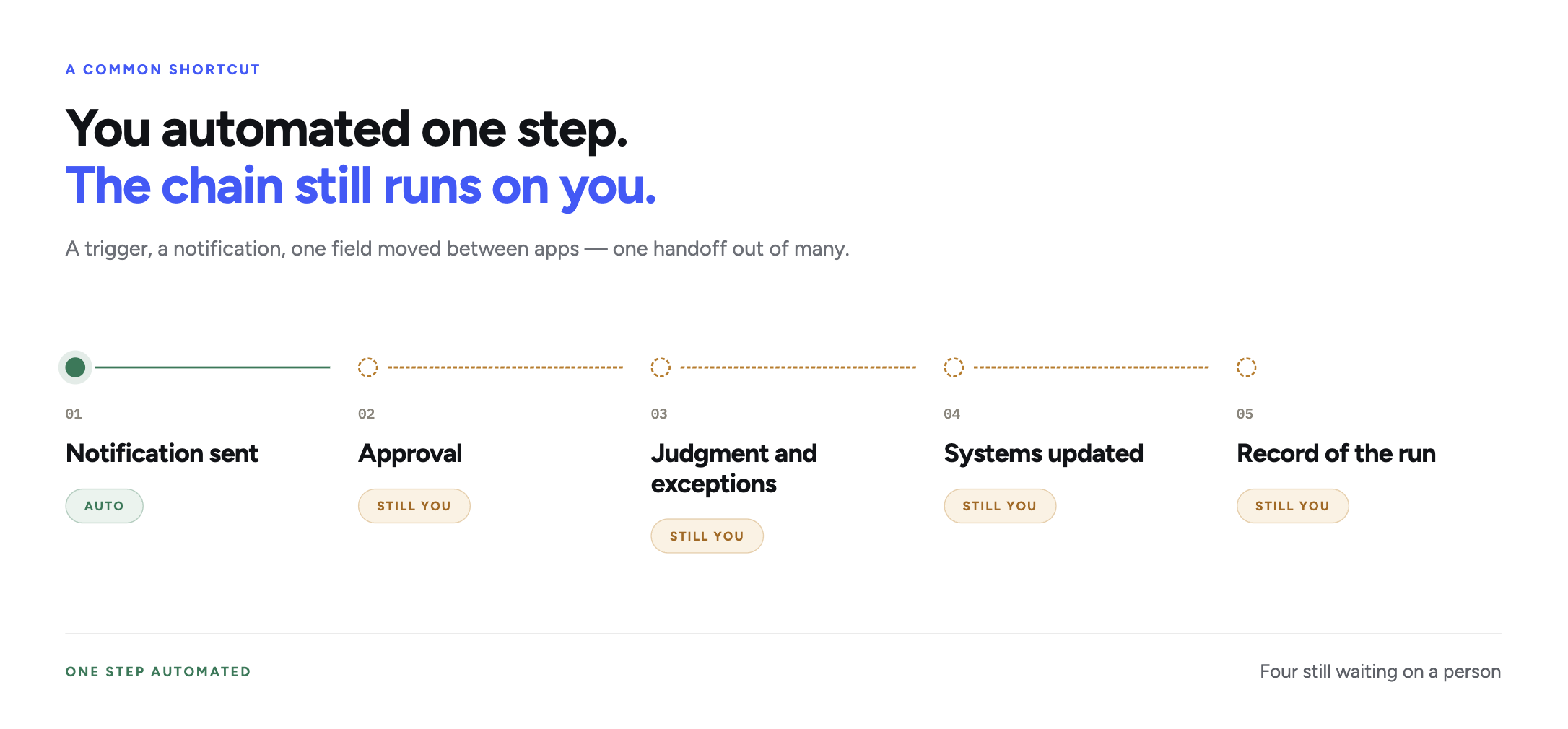
They add a trigger, send a notification, or move one field between two apps. That may help, but it can amount to removing one handoff from a much longer chain.
A useful workflow review asks broader questions:
- What starts the process?
- Which steps happen every time?
- Where does someone need context or judgment?
- Which actions require approval?
- Which systems need to be updated?
- What record should exist when the work is complete?
You do not need a technical team to answer these questions. Often, the best person to map the workflow is the operator who has been carrying it. They already know where requests become unclear, where approvals stall, and which exceptions cause problems.
Run this workflow check before you hire or buy another tool
Choose one recurring process that created follow-up work last week. Do not begin with the biggest process in the company.
Write down:
- The trigger: What starts the work?
- The outcome: What must be true when it is finished?
- The route: Which people, apps, and decisions does it cross?
- The owner: Who understands the process well enough to review it?
- The controls: Where should a person approve or confirm an action?
- The evidence: How will you know what happened after each run?
Then ask the harder questions:
- Does the process rely on memory or scattered messages?
- Would it become difficult if one person were unavailable?
- Are you adding headcount mainly to carry more handoffs?
- Would a clearer workflow create time for higher-value work?
A “yes” does not automatically mean you should automate. It means you should stop treating the process as a collection of small tasks and start managing it as one operating chain.
Decide which workflow to tackle first
Before adding capacity, identify the recurring work that already consumes it.
Start with one process. Make each step visible, then name the owner, approvals, systems, and expected record. This will help you decide whether the team needs a clearer process, simple automation, or a governed AI workflow.
The next article explains how I make that choice: Your First AI Workflow Should Be Clear, Not Ambitious.