

How to delegate a whole job to AI - and keep the final say
Prefer to watch? Here's the whole idea in 2 minutes.
You know the sentence: “Right. Now I just need to…”
The AI has given you something useful. You still need to check the details, fix the result, move it into the right app and make sure the next step happens.
In the previous article, I wrote about that remaining work. Here, I want to show you how more of it can move into a workflow without giving AI unlimited freedom.
That’s what deterministic agentic workflows are designed to do. Each part of the job has a method, a responsible role and a way to check whether it happened. You keep the decisions that matter to you.
I’m not asking you to trust AI more enthusiastically. I want that trust to have something concrete behind it.
What a deterministic agentic workflow actually does
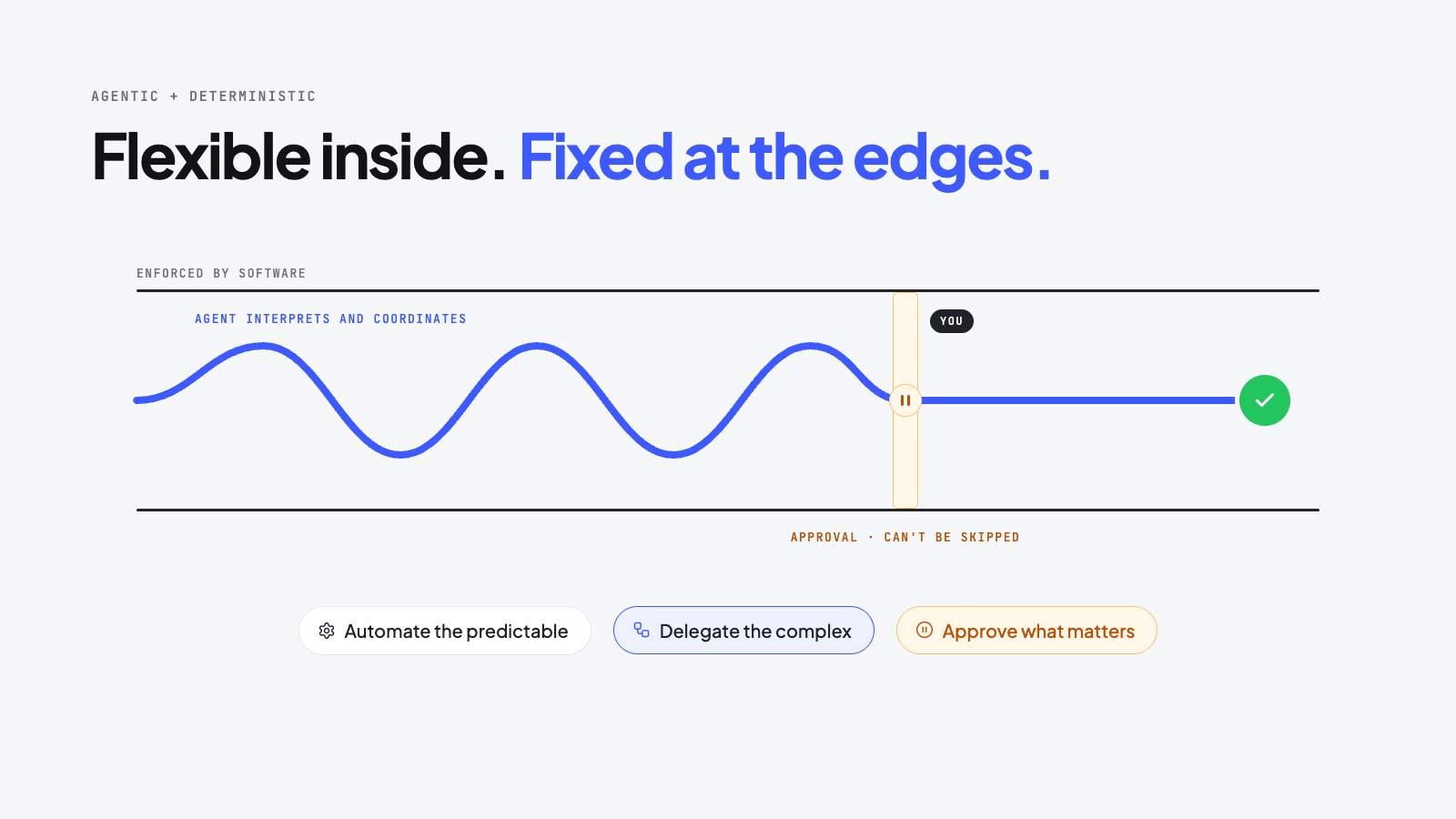
Think about the recurring job you want to hand over. Someone needs to apply your standard, gather current information, coordinate the steps, check the work and carry out the permitted actions. A better draft doesn’t remove those responsibilities. When the workflow doesn’t cover them, they come back to you.
The term sounds more complicated than the idea. Agentic means working toward an agreed goal: interpreting information, coordinating tasks and handling routine choices within the assignment. You delegate the job rather than supply another instruction after every answer.
Deterministic, in the approach I’m describing, means software enforces the limits on available actions. The model can’t decide to skip a required approval.
You need both because different parts of the job need different treatment. A customer inquiry needs interpretation; you don’t want every customer treated identically. A send action that requires permission needs to wait, however reasonable the AI thinks sending might be.
More instructions alone won’t enforce that boundary. Connecting an app won’t tell you whether the right action actually happened, either. Those responsibilities need to be covered in the method.
None of this makes AI judgment infallible. Playbooks, focused responsibilities and checks belong alongside the controls.
The operating principle is straightforward:
Your playbook carries the knowledge you keep repeating
You shouldn’t have to keep explaining something you’ve already explained well.
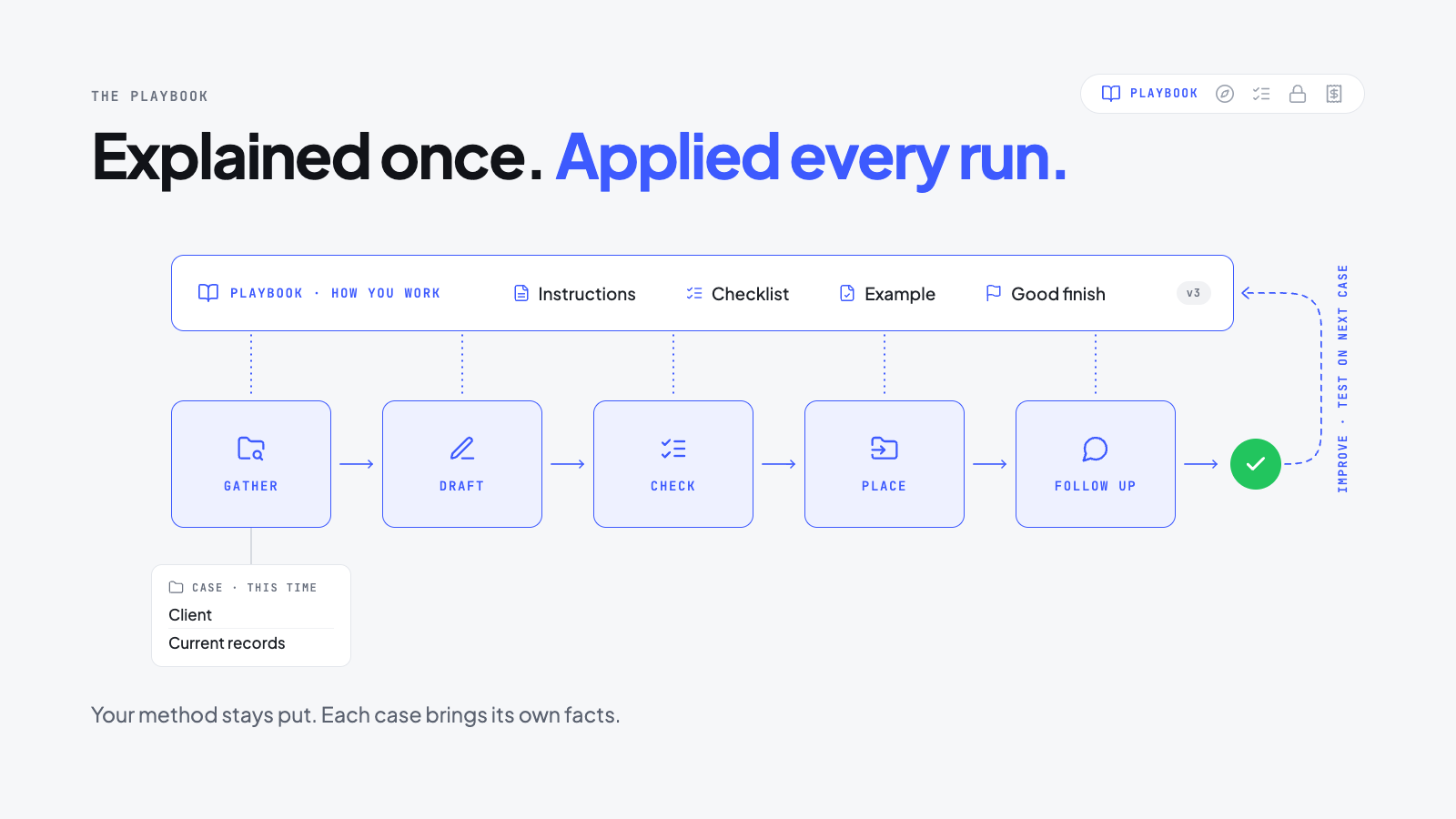
A playbook holds your approved instructions, checklist, examples and definition of a good finish. The relevant parts go into the work where they’re needed, so you don’t have to interrupt halfway through to repeat them.
An example is especially useful here. It shows the structure, detail, language and format you expect far more clearly than “make it professional.” Those expectations also give the verifier something specific to check.
The workflow needs the current case information alongside that method, using records it’s permitted to access. Your playbook explains how you work. The case information establishes who and what you’re working on this time.
Keeping those separate matters. One customer’s exception shouldn’t rewrite your policy, and another customer’s details shouldn’t appear in this result just because their document was the example.
When you notice a recurring omission, you can improve the approved method and its check, then test the change on another case. You’re doing something useful for the next job, rather than only repairing the output in front of you. That’s where the effort you put into explaining your standards starts to go further.
One lead coordinates the work
Giving several AI agents separate tasks won’t help much if you still have to pass every result between them. You’ve just given yourself more things to manage.
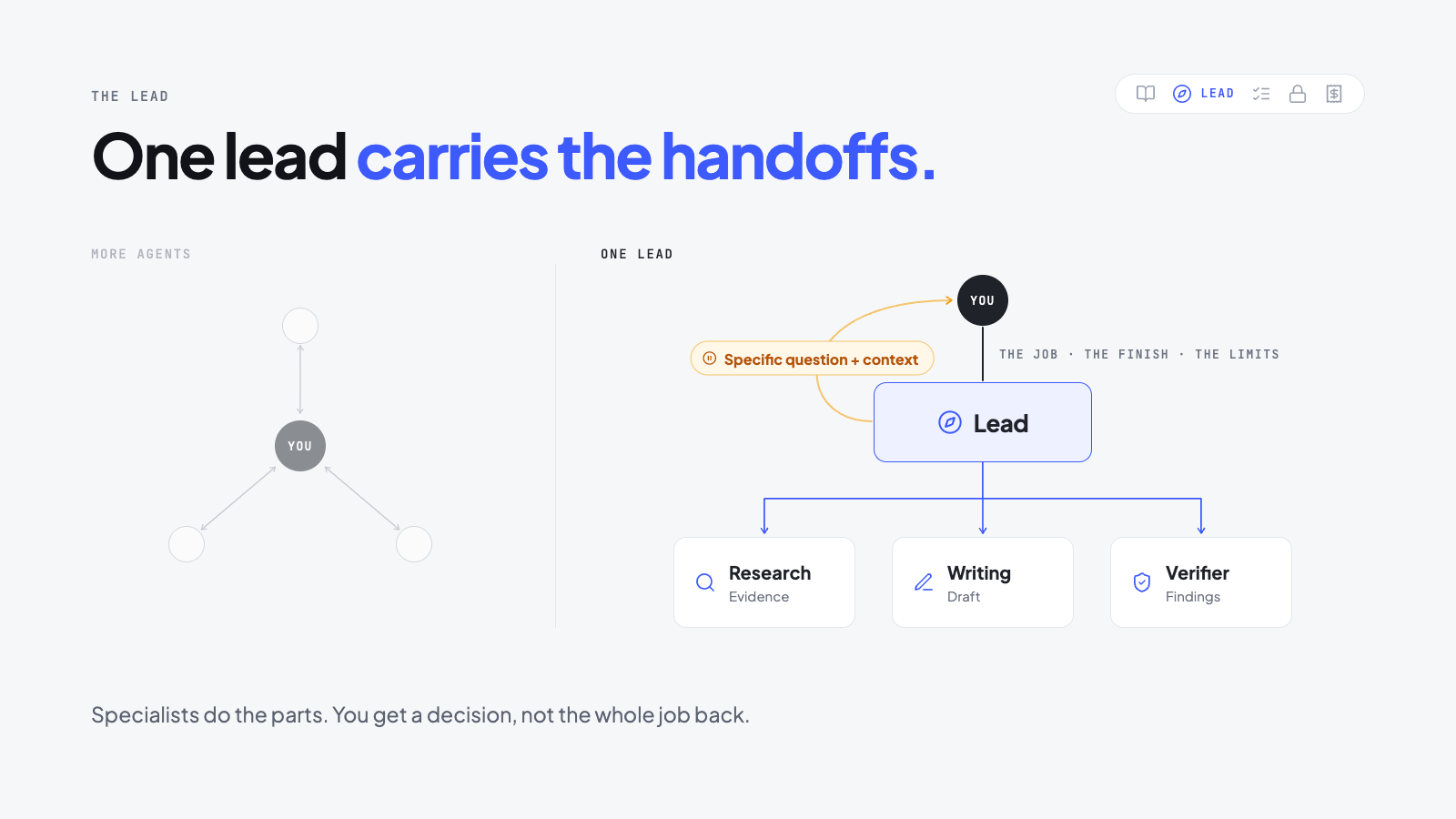
The lead takes the overall assignment: the steps, the finish, the boundaries and the points where your judgment is required. It delegates work to focused specialists and brings their results together.
Each specialist has a defined responsibility, relevant instructions and the tools needed for that part. A research role gathers evidence. A writing role uses that evidence and your example. A verifier checks the result. You can specify what each must deliver and check it against that responsibility, rather than rely on one broad instruction to cover everything equally well.
I think about it like a building crew. You agree the job with the lead; you don’t personally coordinate every handoff between the electrician, plumber and painter.
The number of agents isn’t the point. I want the smallest useful arrangement that takes routine coordination off you. When something needs your decision, the lead should bring the specific question and its context. You shouldn’t get the whole unfinished assignment back with “What next?”
You still own the outcome. The lead’s job is to carry the coordination you’d otherwise have to do yourself.
Checking and repair belong inside the assignment
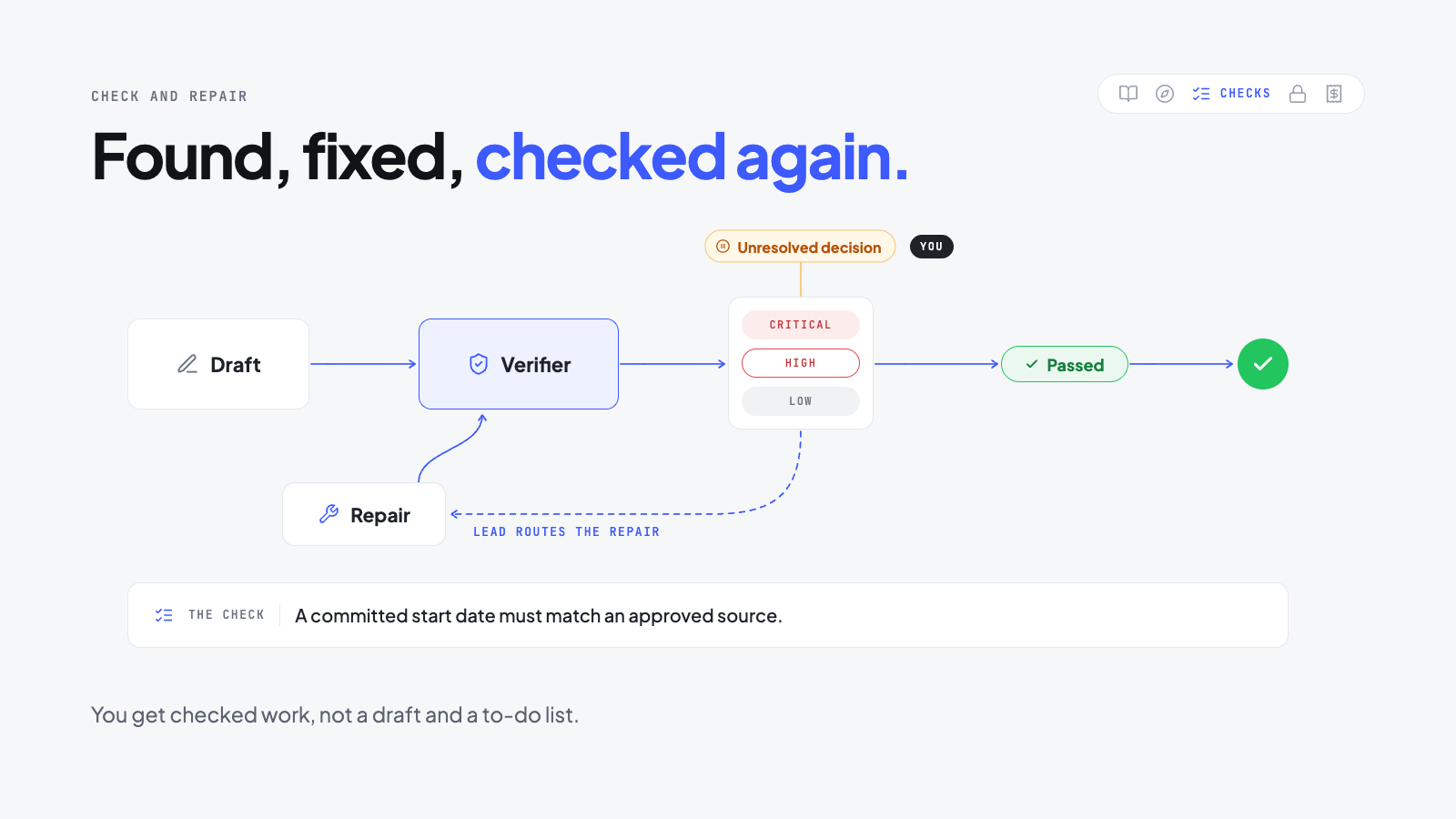
A verifier checks the work against your expectations and the relevant evidence before the result reaches you. It needs something concrete to compare, not just another instruction to decide whether the writing sounds good.
For the onboarding example in the previous article, I’d define a check like this: a committed start date must match an approved source. A date the customer requested isn’t yet a date your business agreed to.
For a report, the checks might ask whether the amounts match the records, the conclusion has supporting evidence and the required sections are present. The result also needs checking against your example. Where calculation is needed, the method calls for calculation in code rather than accepting a plausible-looking number in prose.
Finding an issue is only useful to your workload if the workflow then does something about it. In the method I describe, the verifier reports issues by severity. The lead sends critical and high-priority issues back to the responsible specialist for repair. The corrected work needs checking again, and unresolved decisions come back to the appropriate person.
You’re no longer simply receiving a flawed draft and a list of things to fix yourself. Checking and repair are part of the assignment you handed over.
Checks can still miss errors, and your judgment still matters. But the process no longer relies on you being the first person to discover every ordinary mistake.
The software has to enforce your permissions
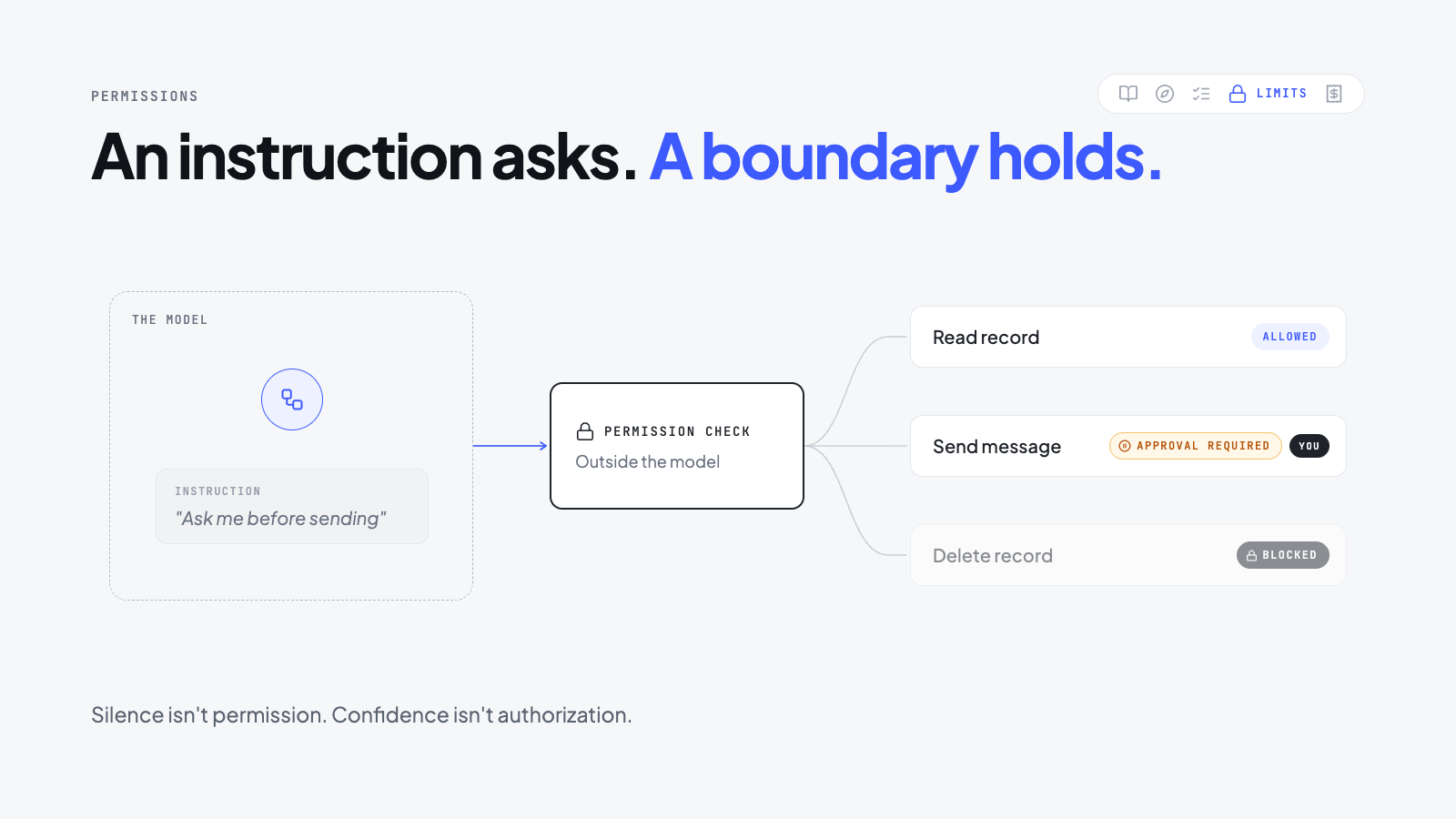
“Ask me before sending” is an instruction. A software control that requires approval before the send action can execute is a boundary. I don’t want that boundary to depend entirely on whether the model remembers to follow the instruction.
This is the deterministic part of the method: the permission check sits outside the model. For each supported app action, there are three choices:
- Allowed: it can run under the permissions already granted.
- Approval required: it must wait for the required authorization.
- Blocked: it isn’t available for the AI to execute.
You and the people authorized to manage the relevant access decide those limits. Reading a record, changing it and sending a message are separate decisions. You can allow routine preparation without also allowing every consequential action.
When an action requires approval, it waits. Your being busy doesn’t turn silence into permission, and the model’s confidence doesn’t authorize it.
The approval request matters too. It should include the proposed action, relevant facts, checks and any uncertainty. You need enough context to make the decision without researching the whole job again just to understand what you’re approving.
This is how you can hand over more of the work while keeping the decisions you care about.
What counts as finished?
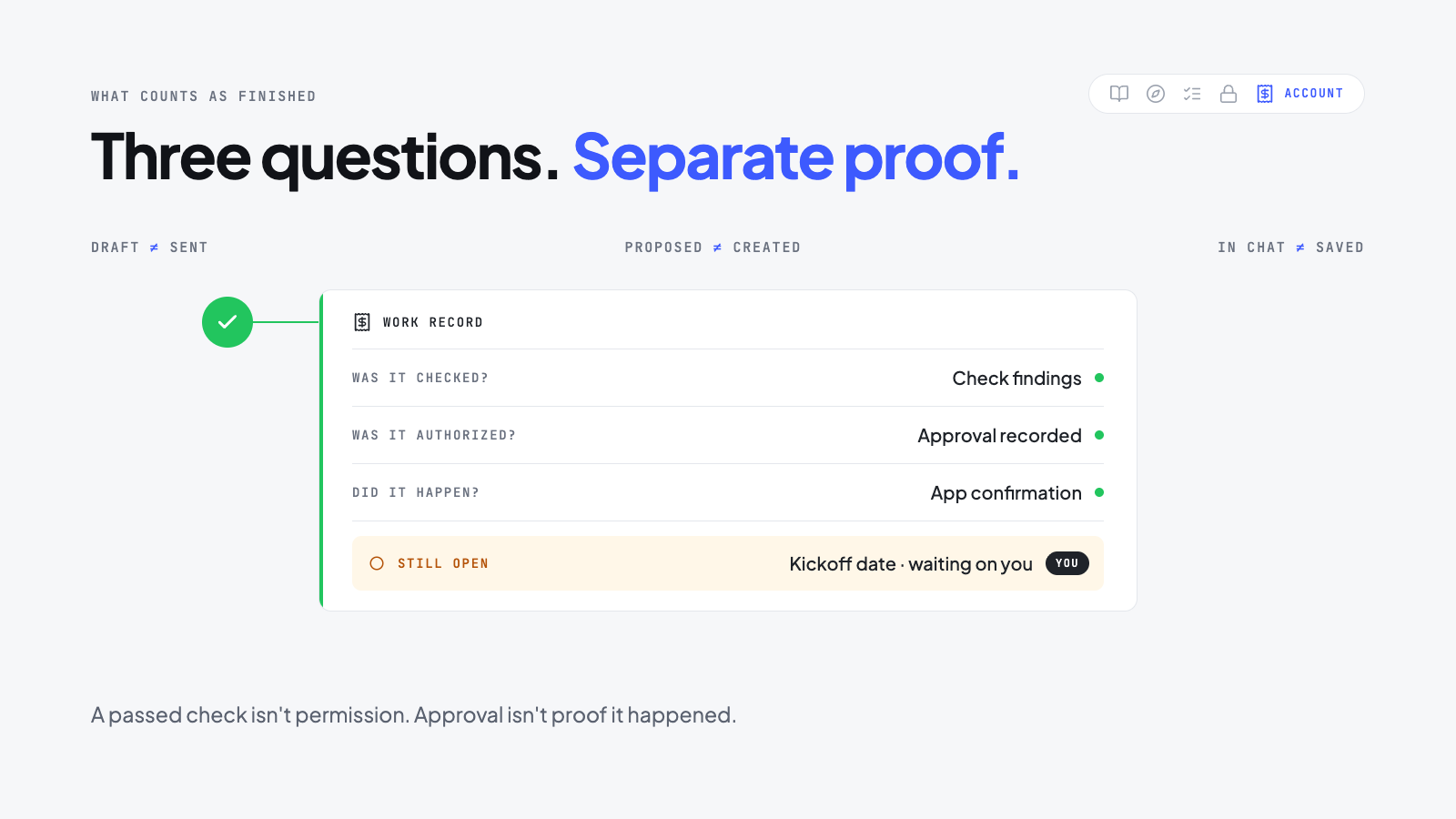
A report sitting in a chat isn’t the same as a report saved where your team needs it. Proposed tasks aren’t created tasks, and an email draft isn’t a sent message.
When the assignment includes putting the result into another app, that action belongs in the workflow. Agree on the output, format and destination before starting, and confirm that the selected workflow supports the exact actions involved.
I keep three questions separate when judging what happened:
- Was it checked? Look for the expectations, evidence and check findings.
- Was it authorized? Look for the applicable permissions and approvals.
- Did it happen? Look for the resulting work and relevant app confirmations.
Those questions answer different things. A passed check doesn’t grant permission. Approval doesn’t prove an action succeeded, and an app confirmation doesn’t prove every fact in a document is correct.
You also need an account of unfinished work: what’s waiting or blocked, what’s missing and who can move it forward. A failed step mustn’t disappear into a cheerful completion message.
The result should give you something you can inspect and act on, whether that’s evidence of a finish or a clear next step. You shouldn’t have to reconstruct the job to find out where it stopped.
Make sure the method holds up next time
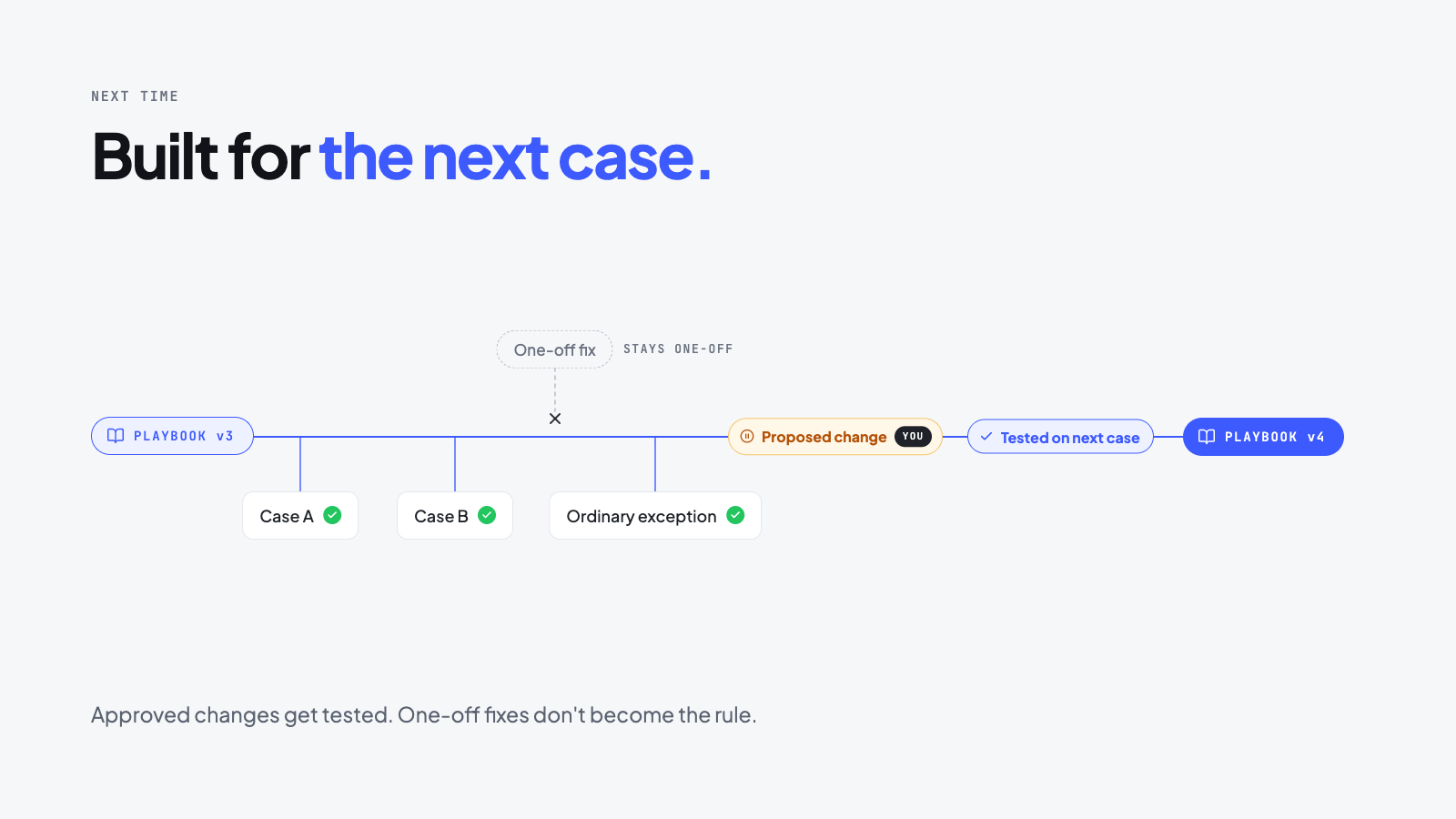
One impressive result is a beginning. A recurring job needs a method that holds up on the next appropriate case and on an ordinary exception.
That means reusing the approved playbook and checking against the same standard. When the process changes, approve and test the improvement. A one-off correction shouldn’t quietly become everybody’s new rule.
For shared work, keep the relevant history and decisions together. An authorized colleague should be able to run the method without collecting screenshots or asking you to reconstruct the background. Permission to run it shouldn’t automatically give them permission to rewrite it.
Before you depend on the workflow, there are practical questions to settle. You need to know what starts the job, who handles blocked work and which recovery route is supported. You also need to understand the effort and costs involved, including review, repairs and relevant platform, model and outside-tool charges.
Those belong in your evaluation, rather than becoming surprises after setup. You’re looking for a maintained method that you and your team can repeat with less total effort. A faster draft alone doesn’t tell you that.
Why I built willdo this way
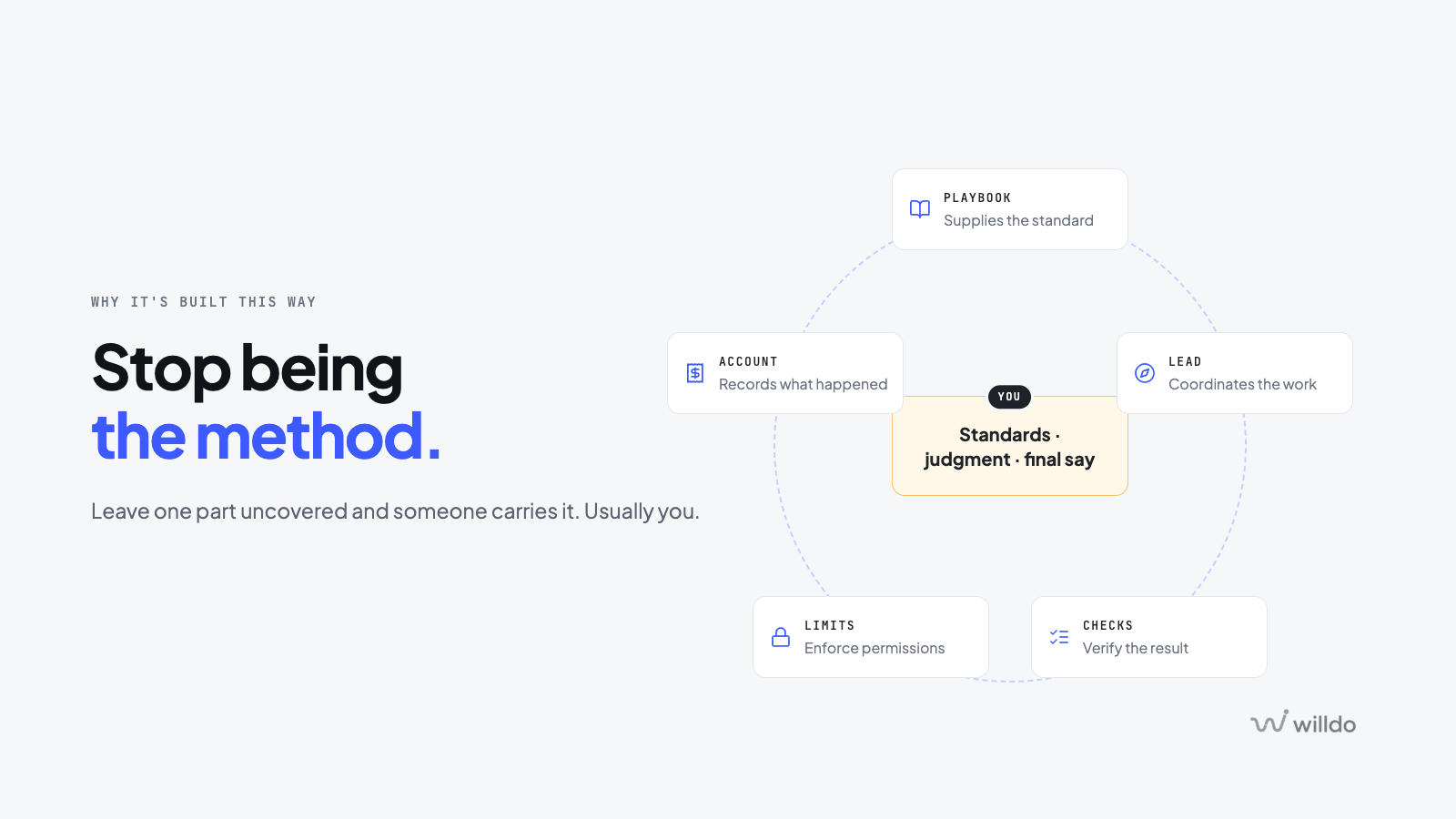
The pieces work together because they cover different responsibilities. Your playbook supplies the standard; focused specialists do the work; the lead coordinates them. Verifiers check the result, the lead routes repairs, and software enforces action permissions. The work record accounts for what happened and what still needs attention.
Leave one of those responsibilities uncovered and someone else has to carry it. Too often, that’s you.
I’ve spent the past year building willdo, an AI workflow platform for growing businesses, around this approach. I don’t want you to have to become a workflow engineer before getting value from it.
Templates give you a relevant starting point to inspect, try and adapt. You can also describe your process, bring an existing procedure or provide an example of the result you want.
Start with one recurring job whose finish you can judge. Check its scope, access requirements and important decisions, then try your own work. Inspect the result and test the next case before expanding.
You bring your standards, taste and judgment. The workflow is there to carry more of the preparation, coordination and repair around them. That’s the relief I’m building for: being able to remain responsible without staying involved in every ordinary step.
On 12 October, I’ll show you how to use willdo
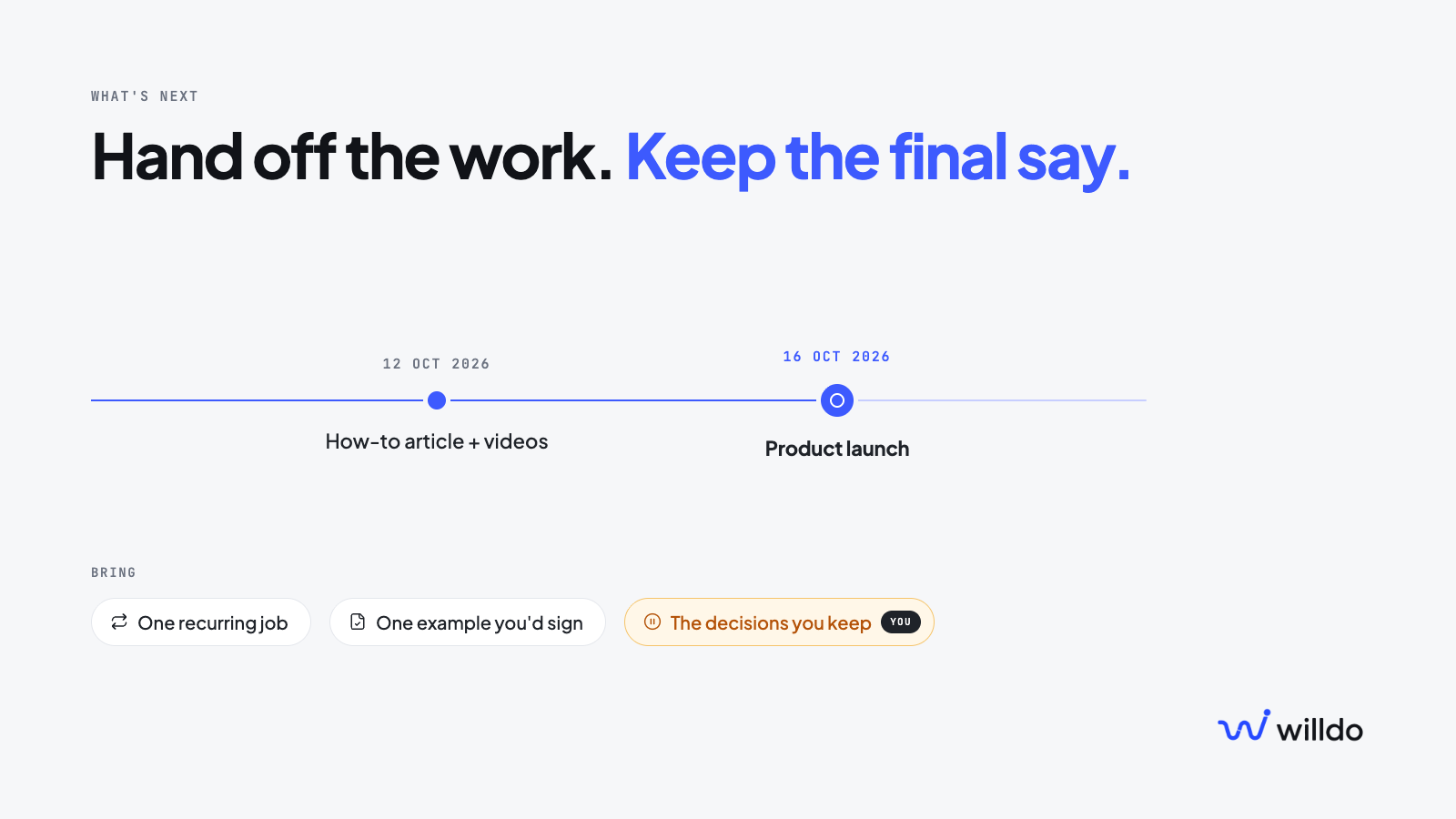
By now, I hope you have a particular report, proposal, customer case or handoff in mind. You know the work you’d like to stop holding together. The next question is how to turn it into a workflow you can run.
On 12 October 2026, I’m sharing the next article and videos showing exactly how willdo works: how to get started, bring your way of working into the software and judge the result.
Bring one recurring job, one example you’d happily put your name on and the decisions you want to keep. You’ve already seen AI produce impressive work. Now you need to see how your job can reach a finish without you carrying every step.
Hand off the work. Keep the final say.


